


Artful Agenda - Plan in Style!
4.02.27K Reviews
App Specs
- Version
- 1.27.4
- Updated On
- License
- Free
- Downloads
- 500,000+
- Developer
- Artful LLC
- Categories
- Productivity
- Platform
- Android
Screenshots
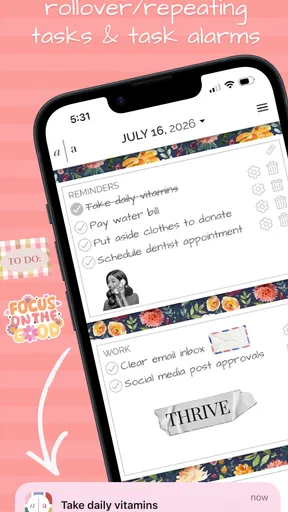
 Analysis by AppCompare
Hey there! I’m excited to dive into my latest obsession, the Artful Agenda app. If you’re anything like me, juggling a packed schedule can feel like a circus act. Enter Artful Agenda, a digital planner that’s not just practical but also a feast for the eyes. Let’s get into why this app is worth checking out!
Paper-planner habits, without carrying the paper
The central appeal here is the way Artful Agenda brings a paper planner’s visual feel into an online productivity app. That changes the experience more than a simple theme does: instead of treating your calendar as a bare list of appointments, you can approach the week as a page to review and organize. I find that especially useful when a calendar view helps me understand how a day fits together at a glance.
That style is not automatically better for everyone. If you already enjoy a plain digital calendar and mainly need to check the next meeting, a traditional calendar may feel quicker. Artful Agenda makes more sense when the act of arranging plans is part of how you think, and when an inviting planner layout encourages you to return to your schedule rather than avoid it.
First Impressions: A Planner with Personality
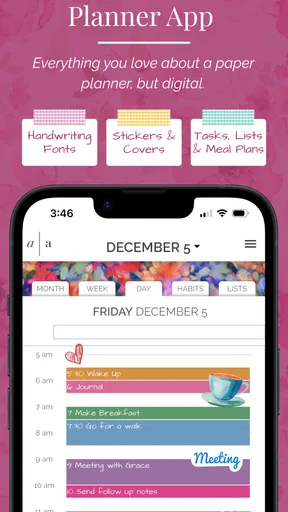
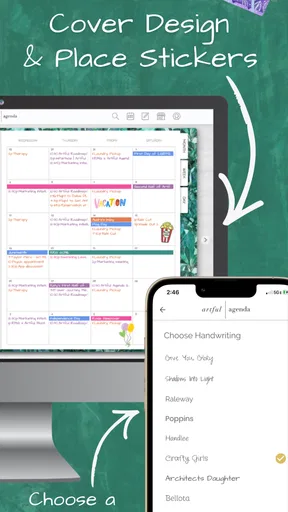
From the moment you open Artful Agenda, it’s clear this isn’t your average planner app. The design is sleek and colorful, offering a variety of customizable cover designs that make it feel personal. It’s like having a stylish notebook right on your phone or tablet, minus the paper cuts.
The interface is intuitive, making navigation a breeze. Whether you’re tech-savvy or just stepping into the digital planning world, you’ll find your way around without a hitch. The vibrant aesthetics don’t just make it pleasant to look at, they actually make planning something to look forward to.
What the planner approach changes in daily use
For me, the best way to use this kind of layout is to plan in passes rather than trying to make every decision at once. I can first look at fixed appointments, then add tasks around them, and finally check whether the day still looks realistic. That last step matters: a page crowded with attractive colors can still represent an overloaded day. The visual format helps me notice the pile-up, but it cannot decide which commitment should move.
A useful habit is to keep calendar events and flexible tasks mentally distinct. An appointment has a time attached; a task may simply need to happen sometime that day. When both are visible in one planning routine, it is easier to see whether errands and focused work have room between obligations. I would avoid putting every vague idea into the same daily view, though. Keeping a short, chosen set of priorities makes the planner easier to read than turning it into a storage bin for every possible task.
Worth Reading Before You Choose

EA SPORTS FC Mobile 26 Is a Bigger Football Game, but It Takes Time

Flipboard Shows What News Apps Must Do Beyond the Feed

Switching to Android Auto Means Rethinking Your Driving Routine

Google Calendar Makes a Crowded Week Easier to Manage

Ludo King Makes the Most of the Minutes Between Plans

Baby Panda World Brings Quick Play to Modern Phones, but Its Game Library Feels Busy
Features That Stand Out
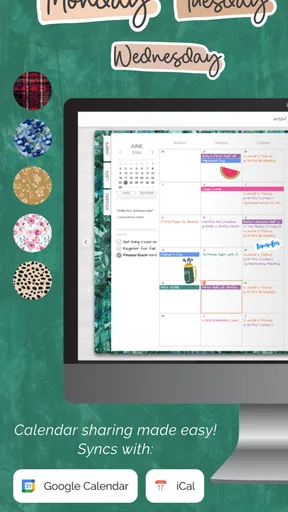
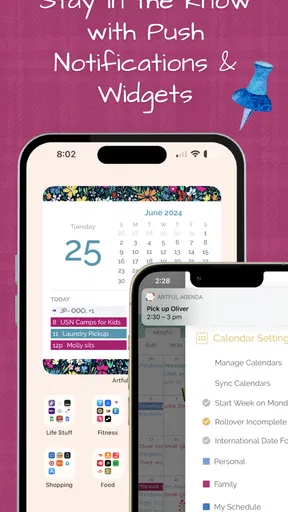
The features of Artful Agenda are where the magic happens. It syncs seamlessly with your existing Google, Apple, or Outlook calendars, so no need to start from scratch. It’s like giving your current calendar a stylish makeover.
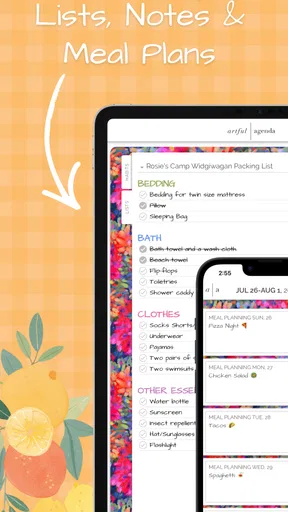
To-Do Lists: I’m a big list person, and the app’s to-do list feature is top-notch. You can create multiple lists, organize tasks by priority, and even check them off with a satisfying tap. There’s something gratifying about ticking things off a list, right?
Multiple lists are most helpful when they have clear jobs. I would keep, for example, recurring household reminders separate from work tasks, so a busy workday does not bury the grocery note and a weekend list does not distract from today’s deadlines. Priority labels can also be more useful as a decision aid than as decoration: if everything is marked urgent, the label stops helping. A short list of genuinely important items gives the planner a better chance of guiding the day.
Meal Planning: If meal prepping is your jam, you’ll love the meal planning feature. It’s straightforward and helps you keep tabs on what’s cooking each week.
I’d treat meal planning as a practical weekly prompt, not as a promise to cook every meal exactly as imagined. A realistic routine is to sketch out a few dinners, then leave room for leftovers or a change of plans. That makes the feature useful even if you do not batch-cook or follow a strict meal-prep routine. If your main need is a recipe database, shopping automation, or nutrition analysis, a dedicated food app may be a better fit; the value here is having meal plans alongside the rest of your planning.
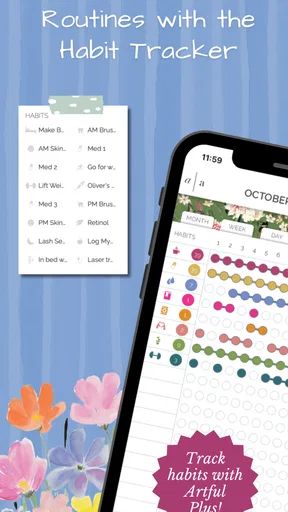
Goal Tracking: Setting and tracking goals is a breeze with this app. Whether they’re daily, weekly, or monthly, you can keep all your ambitions organized in one spot.
For goals, I get more from a small next action than from writing a broad ambition and leaving it untouched. A goal such as making time for a personal project becomes easier to revisit when I connect it to a manageable task in the week. The planner can help keep that intention visible, but it does not replace the judgment needed to set a sensible target or adjust it when life changes.
A realistic week: keeping plans usable
Imagine a weekday with a morning appointment, a work deadline, a grocery stop, and dinner to sort out. I would start with the appointment already on my calendar, use the day’s task list to identify the deadline as the main priority, and place the grocery errand where it fits instead of pretending every task can happen at once. Then I’d use the meal plan to decide what dinner needs, rather than making a second, disconnected list. The benefit is not that the app removes the busy day; it gives me one place to notice the collision before I reach the evening.
At the end of the day, I’d move unfinished flexible tasks instead of copying them blindly into tomorrow. That small review keeps a planner from becoming a trail of overdue intentions. It is also a good moment to check the coming days: a task that looks manageable today may need to be scheduled earlier if the next day is already full. This kind of brief reset is where the planner’s visual organization can earn its place in a routine.
Why It’s Worth the Download
For those who appreciate aesthetics as much as functionality, Artful Agenda is a gem. The ability to switch up themes and covers keeps the app feeling fresh and new. Plus, the attention to detail in its design makes planning feel less like a chore and more like a creative outlet.
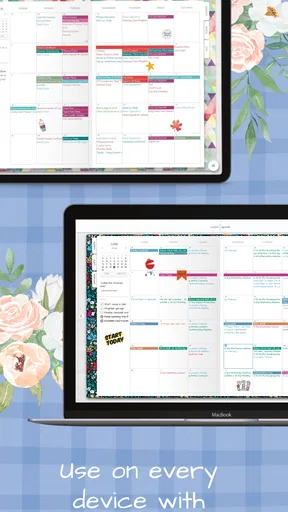
Another highlight is the app’s ability to sync across devices. Whether you’re on your phone, tablet, or desktop, your schedule is always up to date. No more scrambling to find where you left off last.
Calendar syncing is particularly useful if other people or services already place events on your calendar. Rather than rebuilding those commitments by hand, you can keep the existing calendar as the source for appointments and use the planner around it. I’d still take a moment to check that the calendars I rely on are connected and displaying as I expect before making the app my only planning view. A planner is only dependable when the information I need is actually in front of me.
How it compares with simpler alternatives
Compared with a standard calendar app, Artful Agenda puts more emphasis on the experience of looking through a planned week. That can be a genuine advantage for someone who likes a notebook-like overview, but it may feel like extra visual weight to a person who wants the fastest possible route to an event time. A plain calendar is often the better choice for quick scheduling and lightweight reminders; this one appeals more when tasks, meals, goals, and appointments are part of a broader planning ritual.
It also differs from a dedicated task manager. A task manager can be preferable when projects need detailed breakdowns, complex workflows, or a highly focused task-only view. Artful Agenda’s appeal is bringing different parts of personal organization into a planner experience. I would choose it for coordinating ordinary life across a week, not assume it replaces specialized tools for every kind of work.
Room for Improvement
While Artful Agenda excels in many areas, there are a couple of tweaks that could take it from great to outstanding. For instance, while the app offers a lot of customization, more options for personalizing the planner pages themselves could be a nice touch.
Also, the app’s free version is quite limited. To unlock its full potential, you need to opt for a subscription. However, considering the functionality and beauty it brings to the table, it’s a worthy investment for those serious about digital planning.
That limitation is worth weighing before moving an entire routine into the app. It is free to download, but Artful Agenda also has in-app purchases, ranging from $0.99 to $49.99 per item, so I’d check what is available in the app and whether the paid options match what I actually plan to use. Its current version is 1.26.2, and it runs on Android 6.0 or later. The age rating is Everyone, which makes it broadly suitable from a content standpoint; the more important question for an individual user is whether the planner’s paid features are worth the cost to them.
The visual approach can also become friction if you prefer minimal screens, need to capture a task in the fewest possible steps, or dislike maintaining several lists. And while the app can bring connected calendar events into the planning experience, no digital planner can prevent overbooking if I keep adding commitments without reviewing the week as a whole. I’d use the design to support a realistic routine, not mistake a polished page for a complete productivity system.
Who will get the most from it
I’d recommend Artful Agenda to people who enjoy writing plans in a notebook but want the convenience of an online planner, especially if they already use a supported calendar and want their appointments near their lists and weekly intentions. It can also suit someone who has tried plain calendar screens and found them too clinical to revisit. The app’s 4.0 average from around 4.6 thousand ratings, alongside over 500 thousand installs, suggests that it has reached a substantial audience, though those figures are no substitute for deciding whether its approach fits your habits.
On the other hand, I’d skip it if my priority were a fully free planning setup, a bare-bones calendar, or advanced project management rather than a visually styled personal planner. Artful Agenda is free to try, and it was released on March 27, 2019; Artful LLC is the developer. I’d begin with one week, connect only the calendar I actually use, and test whether the combined view makes planning easier before building a complicated system around it.
Final Thoughts
All in all, Artful Agenda offers a perfect blend of style and substance. It transforms the mundane task of planning into an enjoyable experience. So, if you’re ready to ditch your boring planner and upgrade to something that’s both functional and fabulous, give this app a whirl. You might just find yourself looking forward to your next planning session!
Ready to take your organization game to the next level? You can download Artful Agenda from the links below and start planning in style today!
Pros
- Stylish and intuitive interface.
- Syncs seamlessly across devices.
- Customizable cover designs.
- Integrates with major calendars.
- Includes task and goal tracking.
Cons
- Limited free version features.
- Occasional sync delays.
- No offline mode available.
- Subscription required for full features.
- Limited theme customization.
FAQs for Artful Agenda - Plan in Style!
What are the main features of Artful Agenda?
Artful Agenda combines digital convenience with the aesthetic appeal of a paper planner. Key features include customizable cover designs, color-coded events, to-do lists, meal planning, and goal tracking. The app synchronizes with major digital calendars, ensuring seamless integration and updates across devices. Users can personalize their experience with stickers and themes, making planning both functional and visually pleasing.
Is Artful Agenda available on multiple devices?
Yes, Artful Agenda is available on both Android and iOS platforms, as well as on desktop browsers. This cross-platform availability ensures that users can access their planner anywhere and anytime. It also offers real-time synchronization across all devices, allowing users to update their schedule on one device and see the changes reflected on others instantly.
Does Artful Agenda require an internet connection to function?
Artful Agenda primarily requires an internet connection for syncing data across devices and updating calendar events. However, it does offer some offline functionality, allowing users to view previously loaded data and make changes that will sync once the connection is restored. This ensures that users can continue planning even without internet access.
How does Artful Agenda handle privacy and data security?
Artful Agenda takes privacy and data security seriously. The app uses encryption to protect user data and complies with major privacy regulations. Users can be assured that their personal information and calendar events are safeguarded. Additionally, the app offers settings to control data sharing and manage privacy preferences, providing peace of mind to its users.
Is there a cost associated with using Artful Agenda?
Artful Agenda offers a free trial period, allowing users to explore its features without initial costs. After the trial, a subscription is required to access the full range of functionalities. The subscription model supports ongoing development and provides users with regular updates and new features, ensuring a comprehensive and evolving planning experience.


